How to read TikTok Ads reports and what to optimize every week
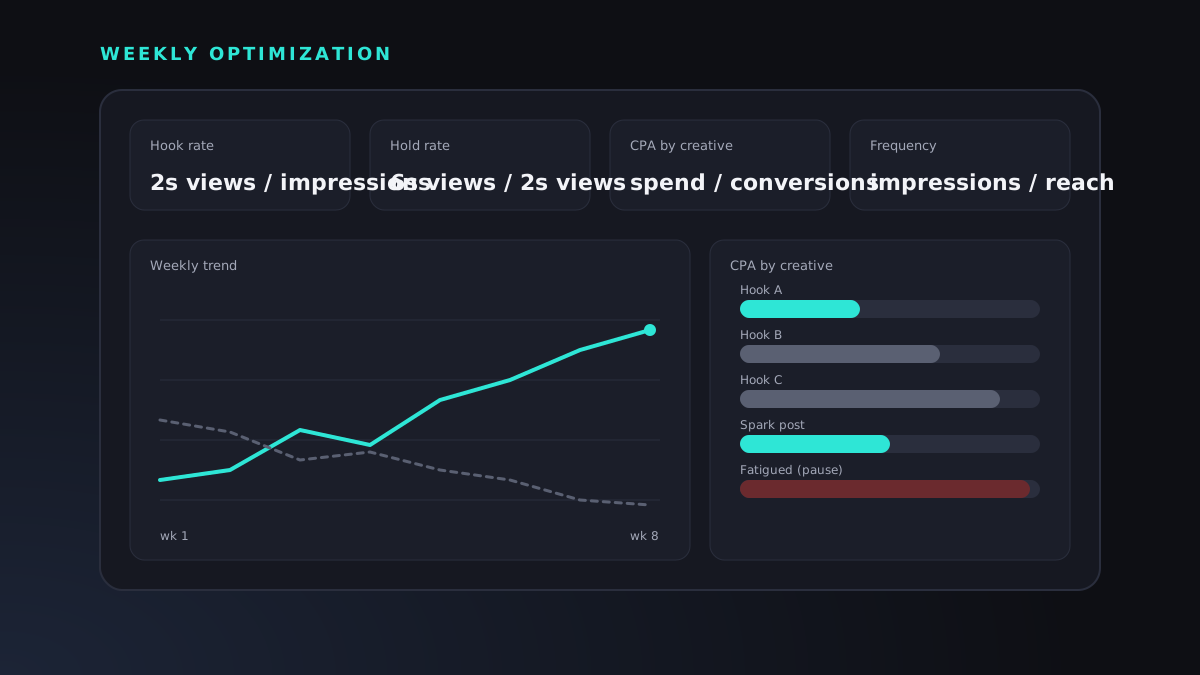
TikTok Ads Manager will show you more than a hundred columns, and most of them will not help you decide anything. The accounts that perform are run by people who look at a small set of numbers in a fixed order, once a week, and change only what the numbers justify. This article describes that review: how to set up the report, which metrics explain each other, and what to optimize weekly without resetting the learning that TikTok's delivery system depends on.
Set up the report before you read it
Start with a saved custom column set in Ads Manager so every review looks at the same data. Our standard set, at the ad level: cost, impressions, reach, frequency, 2-second video views, 6-second video views, clicks, click-through rate, results, cost per result, conversion value and return on ad spend. Add video views at 25, 50, 75 and 100 percent if you want to find where the drop happens inside a video.
Choose a date range long enough to be meaningful. Seven days is the default for weekly decisions; compare it with the previous seven days, not with yesterday. Check the attribution window in the account settings, since a seven-day click and one-day view window will report different numbers from a shorter one, and make sure the window has not changed between the periods you are comparing. Finally, export the same period from GA4 and from your store or CRM. TikTok's reported conversions, GA4's and your actual orders will disagree; the review is about the trend and the gaps, not about one source being right.
Hook rate and hold rate: the creative diagnostics
Two derived metrics explain most of what happens to cost. Hook rate is 2-second views divided by impressions: the share of people who stopped scrolling. Hold rate is 6-second views divided by 2-second views: the share of those who kept watching once stopped. Neither appears as a default column, so calculate them in your export or build them as custom metrics.
Read them together. A low hook rate with a healthy hold rate means the opening is weak but the body works; rewrite the first two seconds and keep the rest. A high hook rate with a low hold rate means the opening promises something the video does not deliver; fix the body or the match between hook and content. Both low means the concept is wrong. Both high but a poor cost per result means the problem is downstream: the call to action, the landing page, the offer or the audience the hook is attracting. Each diagnosis leads to a different action, which is why cost per result alone is not enough to run an account.
CPA by creative, not by campaign
Campaign and ad group averages hide what is happening. One video with a low cost per acquisition can carry three that are losing money, and the campaign looks acceptable. So the second block of the review is a table of every active ad sorted by spend, with cost per result, hook rate, hold rate and frequency beside it.
Set a threshold of spend before judging, roughly the cost of two or three results at your target, so a video is not killed on a single bad day. Above that threshold, ads with cost per result well above target and falling hook rate are paused. Ads below target with stable hook rate get more budget, through the ad group budget rather than by duplicating them, which would restart learning. Ads in the middle are left alone for another week. Write down each decision and the reason; next week's review starts by checking whether last week's calls were right.
Frequency, reach and the shape of fatigue
Frequency is impressions divided by reach: how many times the average person has seen the ad in the period. On TikTok, rising frequency with falling hook rate is the signature of fatigue, and it tends to appear in the second week of a winning video at meaningful spend. Watch it at the ad group level too: if reach has flattened while spend continues, the audience is saturated and either the creative or the targeting needs to widen.
Smart+ campaigns manage much of the audience side automatically, but they still depend on fresh creative to have something new to show. In a Smart+ setup the weekly job shifts from adjusting audiences to feeding the campaign new videos and removing the exhausted ones.
The weekly routine
Our review takes about an hour per account and follows the same order every time. One, pacing: did we spend what we planned, and are there delivery or disapproval warnings. Two, results against target: cost per result and return on ad spend for the week versus the previous week, in TikTok, GA4 and the sales system side by side. Three, the creative table: hook rate, hold rate, cost per result and frequency per ad, with decisions as described above. Four, audiences and placements: any ad group or placement, including the Pangle network, that is clearly out of line with the rest. Five, landing page: conversion rate from GA4 by device, so that a drop in results caused by the page is not mistaken for a creative problem. Six, the written note: what changed, why, what we did and what is next, in plain language the owner can read in five minutes.
Then the changes are made, in a batch, and the account is left alone until the next review except for emergencies such as a disapproval, a broken Pixel or a budget overrun.
What not to touch
The learning phase is the reason restraint matters. TikTok's system needs a steady run of conversions per ad group to stabilize, and budget changes beyond modest steps, bid changes, audience edits and new creative all reset parts of that learning. Daily tinkering produces an account that is always learning and never performing. Resist changing bid strategy mid-week, resist duplicating winning ads, resist reacting to a single day, and resist treating the gap between TikTok's conversion count and your orders as evidence that one of them is lying. Make decisions weekly, from the same report, and let the data accumulate between them.
Every client of ours receives this review as a live dashboard and a written weekly note, discussed in a standing weekly meeting. If you would like to see how your account reads through this lens, send us a message through our contact page.